Back
Back
.jpg)
When you run a school, collecting payments and managing finances are integral parts of your day-to-day role. From before and after care program tuition to club and activity fees, it’s easy to get buried in paperwork. It’s time to trade in your filing cabinets and manual payment collection processes for an online school payment solution!
A reliable payment processor allows you to simplify and automate your program management and registration processes. At CommunityPass, we work with schools every day to streamline payment collection for fee-based programs. In this guide, we’ll answer the following questions:
- What Are The Benefits Of An Effective School Payment Solution?
- What Are The Essential Features You Need In Your School Payment Processor?
- What Differentiates CommunityPass’s School Payment Solution?
Whether you’re digitizing your processes for the first time or you want to upgrade your school’s current payment processing system, you’re in the right place. Let’s dive in!
.png?width=1640&height=240&name=payment%20processing_Banner%20CTA%20(1).png)
What Are The Benefits Of An Effective School Payment Solution?
Your school’s payment solution is the backend tool that processes payments for all the fees within your school program management software. These payments include before/aftercare program tuition, damaged laptop fines, club and activity fees, summer school and camps, community school programs, parking permits, class trips, and more. Plus, your payment solution can even help you fundraise for your school!
However, not all school payment processing systems are built equally—especially if your solution isn’t fully integrated. Rather than using a tool only capable of transferring financial information back and forth between banks, school leaders benefit from a comprehensive payment processing solution that integrates with their program management solution. This allows them to:
.jpg?width=631&height=405&name=payment%20processing_benefits%20(3).jpg)
- Manage and receive funds quickly: Receive funds fast with online payments. Track deposits daily and manage your cash flow. By speeding up transaction times with payment processing solutions, you can improve your operational efficiency and boost customer satisfaction.
- Prevent lost checks: When it comes to you and your community’s financial data, you want the highest level of security. With the right school payment solution, you won’t have to deal with physical invoices and other paper documents, mitigating any risk of important documents or checks getting lost in the shuffle. Having a payment processing solution also provides a secure, standardized way to handle cardholder data, which helps you remain PCI-compliant.
- Enable convenient payment options: Allow parents to make online contactless payments at any time and from anywhere. Parents can automate their payments and store their preferred card on file, making it ideal for programs with recurring fees. Plus, customers can take advantage of discounts, make deposits, and receive bills automatically—all from the comfort of their own homes.
- Improve reporting and data tracking: Create and download reports and payment processing statements to manage your finances. In addition, instead of manually tracking fees whenever parents miss a payment deadline or pick up their child late, you can apply and track any fees to make invoicing a breeze.
What Are The Essential Features You Need In Your School Payment Processor?
To reap the full benefits of these systems, seek out a school payment processing solution with these essential features:.png?width=2060&height=800&name=Recreation-management-software_Recreation-management-system%20(1).png)
- A fully integrated solution: Look for a school payment management system that includes the payment processor and gateway all-in-one. It should also integrate with your school program management software. This enables you to automate your day-to-day activities and streamline tasks like creating invoices for deposits or customizing your pricing structure.
- PCI compliance: The Payment Card Industry (PCI) Data Security Standard is the security standard for all organizations and businesses that handle online payments. To learn more about the specifics of PCI compliance and its different levels, we recommend visiting the official website.
- Acceptance of multiple payment types: Your payment processor should support your most popular payment types, whether that’s e-check, credit card, or debit card. However, don’t limit yourself to online payments! Ensure your payment tool can also process check and cash payment options securely.
- Customizable billing periods and pricing structure: Depending on your school programs and offerings, you might have a program with monthly billing or one that only requires a single payment upfront. Look for a system with customizable billing and pricing structures to fit your needs.
- Automatic bill pay and card-on-file options: One of the most tedious tasks for customers who are billed monthly is entering the same payment information repeatedly. Instead, have parents set up automatic bill pay or enable saved card-on-file functionality. This way, parents can register for another program and use the payment already stored.
- Automatic late payment fees: An automatic late payment fee ensures that as soon as the payment deadline or grace period passes, a fee is charged directly to the customer, discouraging future delays.
- Application of fees and full/partial refunds: If your school decides to cancel a program or a student withdraws from an activity, you may need to issue a full or partial refund. Your payment processing solution should be able to refund balances or apply credits to specific customer accounts.
- Acceptance of partial payments: With some payment processing software, you can ease the burden on your parents by offering payment plans or early registration deposits, as well as sending the appropriate payment reminders.
- Flexible spending statements: When it comes to taxes, having proof of payment is essential. Ensure that your school payment software can provide you with accurate, flexible spending statements.
Investing in a payment processing solution that integrates with your school management software not only facilitates monetary transactions but also allows you to customizes pricing structures, sets different discounts, accepts deposits, creates insightful financial reports, and more! Plus, you'll have consistent payment support from the same people who support your other solutions.
What Differentiates CommunityPass’ School Payment Solution?
When it comes to school program management and payment collection, no one does it better than CommunityPass. We offer features like:
.jpg?width=537&height=441&name=payment%20processing_CommunityPass%20features%20(1).jpg)
- 100% SaaS software, allowing you to save time and money by only paying for what you need
- Fully mobile-responsive design
- Customizable billing periods, auto bill pay, and automatic late payment fees
- Integrations with financial software and student information systems
- Access to 300+ pre-built reports, as well as a customizable report-building tool
- Ability to explore statistics on finances with the click of a button
- Access to a dedicated professional implementation and training team to help prepare your site as it goes live, as well as offer 24/7 ongoing customer support
CommunityPass’s top-rated school program management and registration software also comes with a built-in, fully integrated payment processing solution called TogetherPay (powered by Stripe), bringing you these exceptional benefits:
- Competitive fixed rates: Payment processors typically charge many fees, including a transaction rate for each online payment. Some tools also have monthly fees and other processes that end up charging your school more than you initially thought. With TogetherPay, the rates are fixed, with no monthly minimums or hidden fees.
- Monthly statements: Financial statements are sent automatically to school administrators monthly, allowing you to maintain oversight at all times.
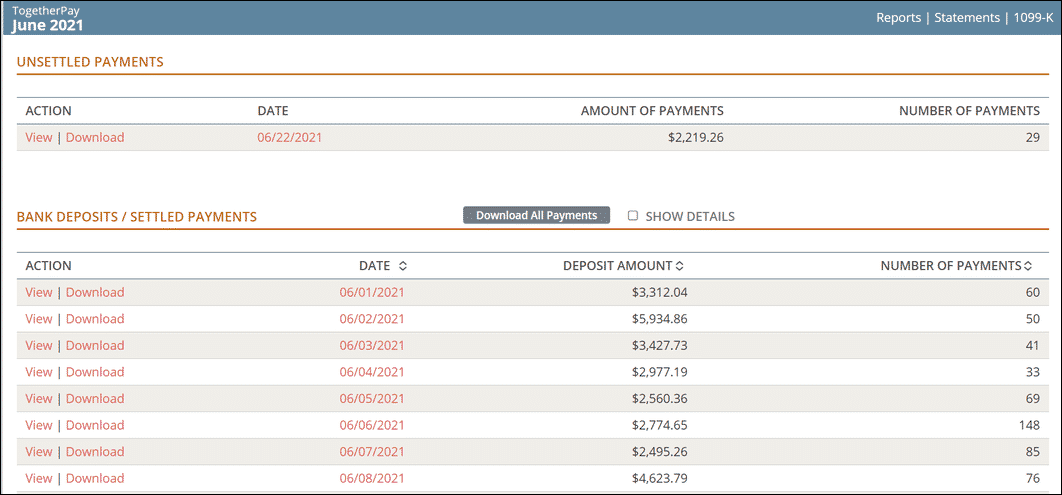
- Daily settlement reporting: Need to create daily settlement reports? CommunityPass and TogetherPay allow you to view or download settlement payments, making financial reconciliation easy and painless.
- Card-present or card-not-present: TogetherPay can process both “card-not-present” transactions as well as “card-present” transactions for ultimate flexibility. This feature enables CommunityPass to support online and in-person payment processing.
- Multi-tender transactions: Customers shouldn’t have to worry about having sufficient funds in a single payment type. TogetherPay allows you to process multiple payment types for a single transaction. For example, parents can pay half with cash and the remaining balance with a credit card.
- 24-48 hour fund deposits: The problem with large payment aggregators like PayPal is that the fund deposit time to your school’s bank account can take a while. Some third-party processors only cash out once a month! With CommunityPass and TogetherPay, we ensure deposits within 24–48 hours.
- Powered by Stripe: CommunityPass uses Stripe to power TogetherPay, one of the largest payment processors in the world, with the highest level of PCI compliance. Benefit from increased uptime, credit card auto-updating, and validated bank accounts for ACH payments. You can also leverage fully integrated, PCI-compliant, EMV-enabled credit card terminals for in-person payments, allowing for greater payment and checkout flexibility.
- Transparent view of all finances and payment processing: With CommunityPass, you can access the online financial dashboard within the administrator console. Staff members with assigned permissions can easily view and download monthly statements, view deposits, and even dig into an individual deposit to reconcile the payment with the registration or purchase. Below is an example of what this dashboard looks like.
The best part of CommunityPass and TogetherPay? You no longer have to coordinate support between software and third-party eCommerce providers, since payment processing is built-in. You can also rest easy knowing that payment questions or requests are handled by the same team that supports the software.
To see how this type of school payment solution can benefit you, let’s explore how CommunityPass helped the East Brunswick School District streamline program management and digitize payment collection.
CommunityPass in Action: East Brunswick Public School District
The East Brunswick Public School District is one of the largest school districts in New Jersey, serving 8,300 students across 13 schools, with nine active before and after care programs. Before partnering with CommunityPass in 2011, East Brunswick managed their program and finances for the entire district by hand:
- All payments had to be mailed or handed in, as credit card numbers over the phone were too risky.
- Billing statements and other notices had to be issued by mail, causing many customers to miss their payment deadlines despite their best efforts.
- Communications for late payments, pick-ups, and payment reminders further burdened the office staff with the task of manually printing and mailing statements.
East Brunswick knew they needed a digital system to track payments and registration status. They wanted a solution that would grow with them without breaking the budget or requiring additional staff members. That’s where CommunityPass came in.
.png?width=2060&height=800&name=School%20Payment%20Processing_east%20brunswick%20(1).png)
After partnering with CommunityPass, East Brunswick Public Schools began the process of digitizing their entire program management system. This meant:
- Registration forms, payments, invoices, payment reminders, and late payment fees all became digital, instant, and automated.
- E-checks became standard within the platform, further mitigating the need for manual check processing.
- Increased accountability for customers by having registrations and payments on the same platform.
Thanks to CommunityPass’s school program management and payment processing solution, East Brunswick tripled its revenue, with credit cards representing the majority of the payment volume!
.png?width=1640&height=240&name=payment%20processing_Banner%20CTA%201%20(3).png)
Wrapping Up
At CommunityPass, we work with schools of all sizes to ensure their payment management systems are best serving their needs. With our payment processing solution for schools, you get access to TogetherPay, which is integrated with our school management system. With CommunityPass, everything you need is right there and ready to go.
For more information and resources on how to best manage your programming, check out our additional resources:
- Afterschool Program Management Software: Learn The Basics. What do you need in your afterschool program management software in order to succeed? Find out in this comprehensive guide.
- School Registration Management Software: 10 Best Solutions. Learn more about shopping for and implementing school registration management software.
- Camp Registration Software: Have Your Best Summer Yet! Does your school offer any summer or camp programs? Make it the best summer yet with our guide to day camp software!
.png?width=1230&height=600&name=payment%20processing_Large%20CTA%20(1).png)